AIR @ Moca Network · Feb 2026 — Now

Scaling AIR's product design with an agentic workflow

AIR is Moca Network's identity and credential product, spanning account access, credentials, finance, travel and loyalty experiences.

I lead and expand AIR's design system as shared product infrastructure across design, code and agentic workflows. Embedded with internal POD teams, I support rapid prototyping and shipping while keeping product quality consistent as speed increases.

Role
Product designer
Timeline
Feb 2026 — Now
Team
3 product managers, 9 engineers, members from business + marketing team

Overview

A system built as infrastructure, not documentation

The problem

AIR now spans multiple product verticals and is touched by product, engineering, marketing and business teams. Without a shared source of truth, experience, design and implementation started to drift. The challenge is to stay consistent, align around shared product principles, improve product quality and increase productivity at the same time.

The bet

Build the system as infrastructure, not documentation. Codify repeated decisions so teams can focus on product judgement, then pair the system with agentic tools for critique, token sync, changelogs and QA diffs. The goal is simple: make the right way to ship easier for both people and agents.

4

Teams adopted the system across design, PM, engineering and BD workflows.

> 50%

Reduction in UI review comments per Credential Dashboard flow.

0

Engineering lift needed for BD to spin up partner demo flows from the design repo.

Step01 Foundations

1. Foundations for people and agents

I started by turning AIR's design foundations into a shared source of truth: tokens, hierarchy, states, spacing, surfaces and usage principles. The goal was not only to help designers and engineers align, but also to give AI agents the same context before generating or editing UI.

The first move was to have Cursor and Claude read through the entire token setup, so the agents and I were working from the same source of truth before any interface work began.

tokens.md AIR / foundations
1# AIR · Colour tokens
2 
3> Source of truth for every surface, icon, button, and link across the system.
4 
5## text
6text-primary     #002536
7text-secondary   #798b95
8text-disabled    #a8b4bb
9text-on-colour   #ffffff
10text-placeholder  #B8CAD4
11 
12## icon
13icon-primary     #002536
14icon-secondary   #798b95
15icon-disabled    #a8b4bb
16icon-on-colour   #ffffff
17 
18## button
19button-primary        #000000
20button-primary-hover  #464646
21button-secondary      #41A7D7
22button-secondary-hover  #9BD5EA
23button-disabled       #d6e0e5
24 
25## container
26container-primary   #f7f7f7
27container-secondary #ffffff
28container-inverse   #000000
29 
30## surface
31surface          #FAFAFA
32surface-dim      #E3E9EA
33 
34## link
35link-default     #002536
36link-hover       #464646

Fig. 01: the AIR token file, read line-by-line by the agents.

Step02 Principles

2. Shared principles for people and agents

The most useful mental model for AI tools was to treat them like a design intern: capable, fast and new to the product. Before they can decide or do, they need to understand how AIR handles hierarchy, state, spacing and surfaces.

So I pulled those decisions into a design foundations page, read by the team and loaded by agents at the start of every session. Same principles, two audiences.

The strategy was deliberately simple: document the basics in a form engineers could sanity-check and agents could read. Foundations first, so speed later would not create inconsistency.

air-design.com / foundations
AIR design system foundations: bento grid, tokens, principles

Fig. 02: the foundations site, with principles, tokens and examples, written to read well for both the team and the agents.

Step03 Workflow

3. A single source of truth for collaboration

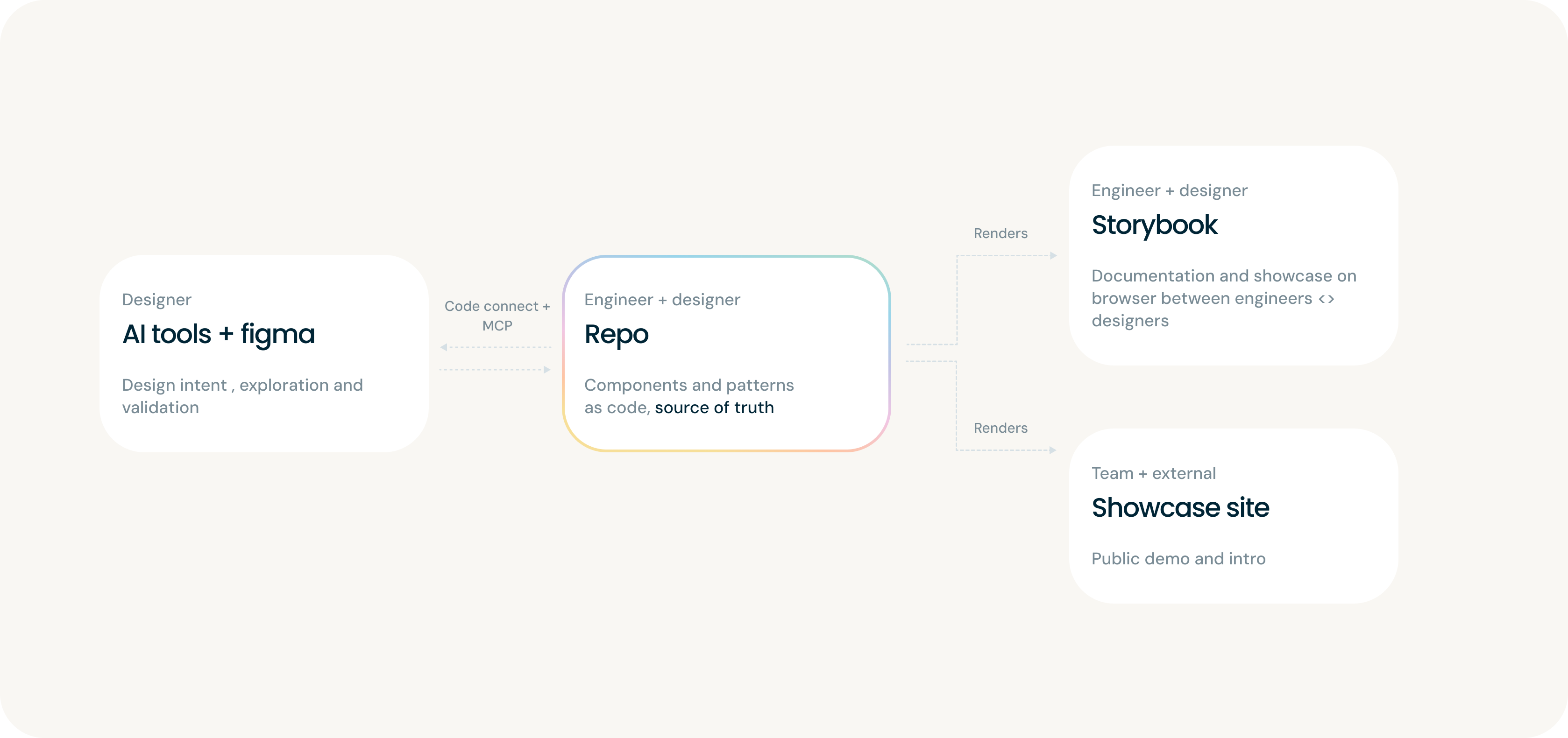
Jonas, our lead engineer, and I aligned on where each decision should live so Figma and code would stop drifting.

We defined four surfaces: Figma, the repo, Storybook and a showcase site. Storybook and the showcase render from the repo, so documentation, previews and implementation stay connected.

For simple changes, I describe the update in Cursor and the agent updates the component and Storybook preview. For larger behaviour or API decisions, Jonas and I align first; he implements with AI, I verify in Storybook, and the PR becomes the review gate.

Diagram: AI tools + Figma flow into the Repo via Code Connect + MCP; the Repo renders into Storybook and the Showcase site.

Fig. 03: Design repo as the single source of truth. Figma reads and writes through Code Connect; Storybook and the showcase site render from code so nothing drifts.

Step04 Repo

4. Structuring the design repo

Once the workflow was clear, the repo needed a shape. I structured it like a product: packages for what engineers ship, docs for what the team and agents read.

The goal was one home per decision, so designers, engineers, AI agents and new teammates could understand where an edit belongs before opening a file.

Fig. 04: the repo as a branching diagram. Code on one side, docs on the other; every folder has one job.

Step05 Adoption

5. Adoption is the real test

Once the system shipped, the clearest signal came from adoption. Designers, PMs, engineers and BD each picked it up in a different way, showing where the system was working and what needed to improve next.

For me, as a designer

Hectic, but exciting. The system has reshaped what my design work looks like day to day:

  1. Build higher-craft prototypes faster. Layout, interaction and motion are easier to explore on tight timelines, while the repo gives prototypes a consistent product baseline. For larger flows, I use the repo where it helps most: turning ideas into reviewable product directions while holding the line on UX quality.

    Fig. 05a: Context change for the whole page.

    Fig. 05b: Page slide. UI components that appear in the same position across pages are treated as a static overlay and are not affected by the slide transition.

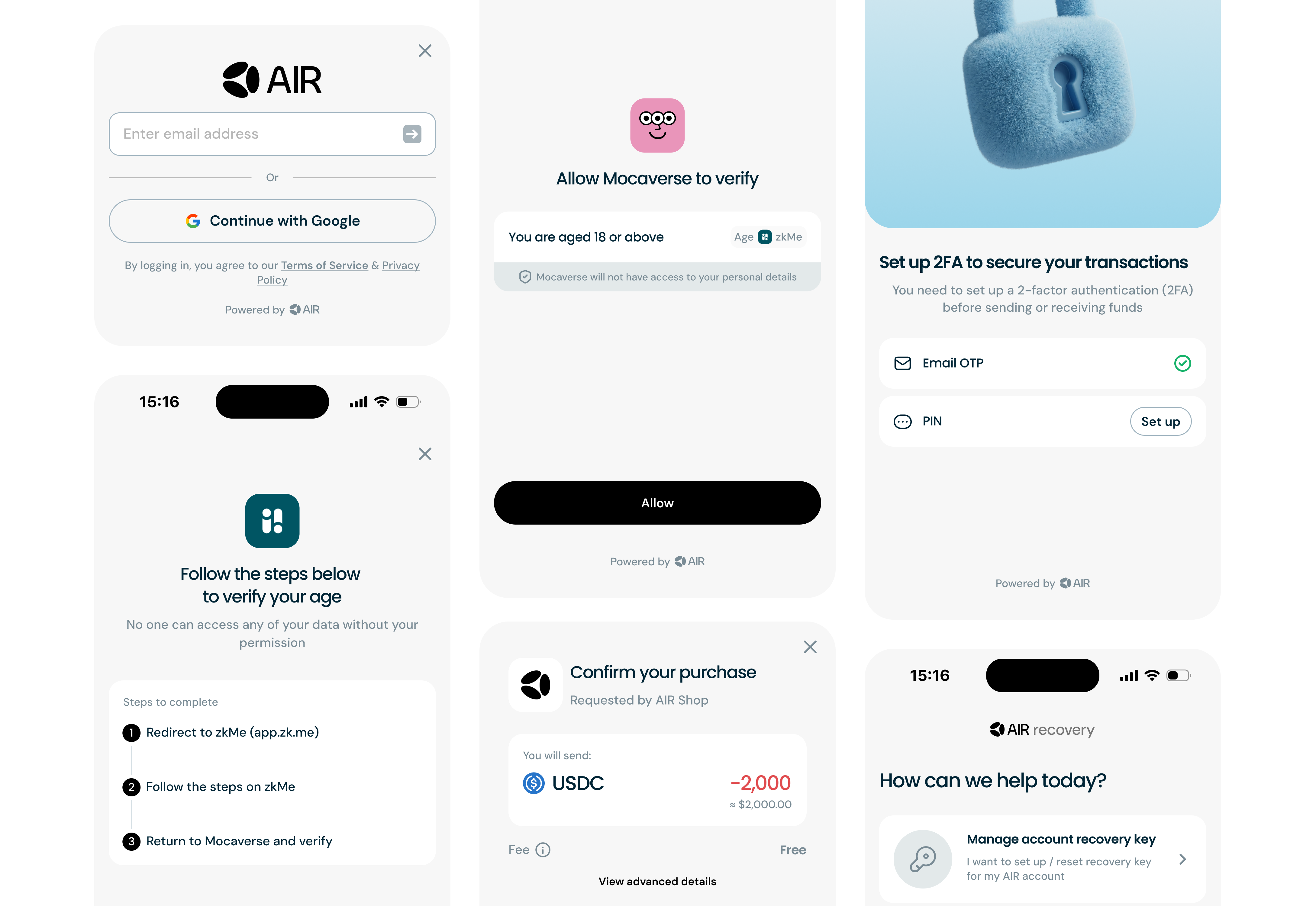
    Fig. 06: A prototype of the "verify credentials on behalf" flow, shared with stakeholders for review.

  2. Reviewing is a bigger part of my week now. I audit my own AI experiments and designs other teammates generate with AI, then document the prompts, patterns and review process that help the team raise the bar.
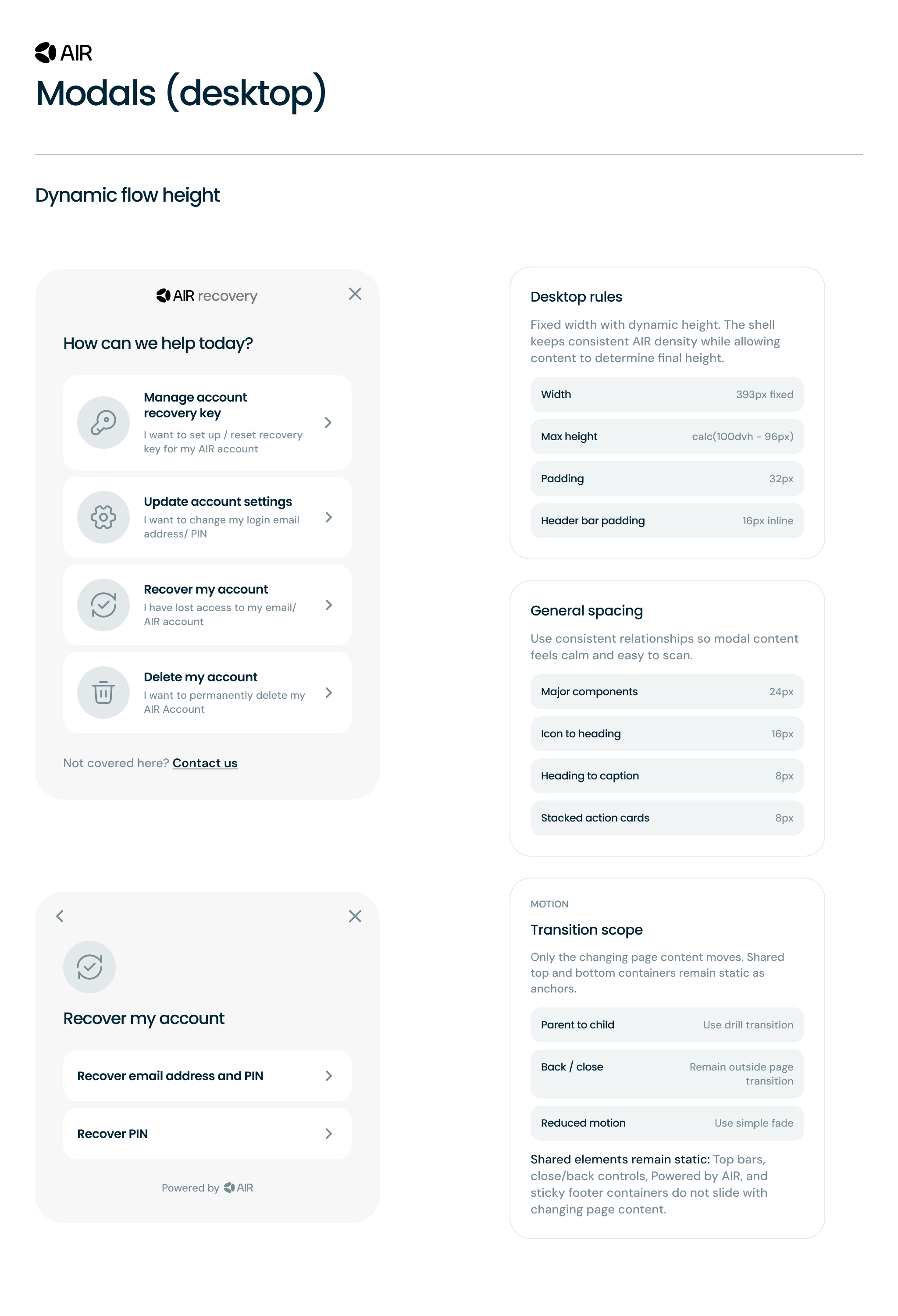
  3. Write specs that work for humans and agents. Design guidelines now describe not just what a component looks like, but how it should render and behave: rules, edge cases and transitions. Being explicit gives agents the same context a designer would have.
    AIR design system spec page for modals (desktop): two modal mockups (account recovery menu, recover my account flow) on the left and rule cards (desktop rules, general spacing, transition scope) on the right.

    Fig. 07: Design spec for modals, with explicit rules on width, height, motion behaviour…. written for both designers and agents to render the component identically.

For product managers
  1. Prototypes are becoming the new PRD. The output is on-brand by default, but on-brand is not the same as coherent. Design now reviews whether the proposed flow makes sense, whether an interaction feels right and whether the whole thing holds together. We now ship more prototypes in a month than we used to in a quarter.
  2. The repo is becoming the source of truth for product decisions. What used to live only in a PRD now lives alongside the design as a pattern.md, embedding rules directly into the work being built.
For developers
  1. Specs show up as working code, not pictures. Tokens, components and patterns land in the repo the same way they ship, so handoff becomes a pull rather than a translation. Fewer "what did the designer mean?" threads; more time on the real engineering problems.
  2. UI bugs drop sharply by the time a PR lands. On the Credential Dashboard, UI-related comments dropped from 20+ per flow to under 10, and several handoffs went spec → working PR without a single round of back-and-forth.
For the business team
  1. BD is building tailor-made flows for partner demos. Pulled from the repo and deployed to Netlify, BD can review and add new use cases when pitching to partners, without a design ask or an engineering lift.
    demo.air3.com / quick-walkthrough

    Fig. 08: a quick walkthrough of the BD demo site. Pulled from the design repo, deployable end-to-end without engineering lift.

    Small UI bugs still need a designer to annotate and debug, but the communication loop is much simpler now: just BD ↔ design, no engineering middleman.

Reflection

I don't think AI will replace product designers. The tools give us more ways to explore ideas, test workflows and move between first instinct and final pixel.

What changed most was the shape of my role: some weeks I was making components, other weeks I was reviewing prompts, writing specs or pairing with BD on partner demos.

The takeaway I'm holding onto: don't let the noise decide for us. Try the tools ourselves, stay curious and use them to become better builders.

Up next

AIR Kit identity and wallet UI screens

Building AIR Kit: a reusable SDK for onboarding, credentials, and identity checks

View project